
Short answer
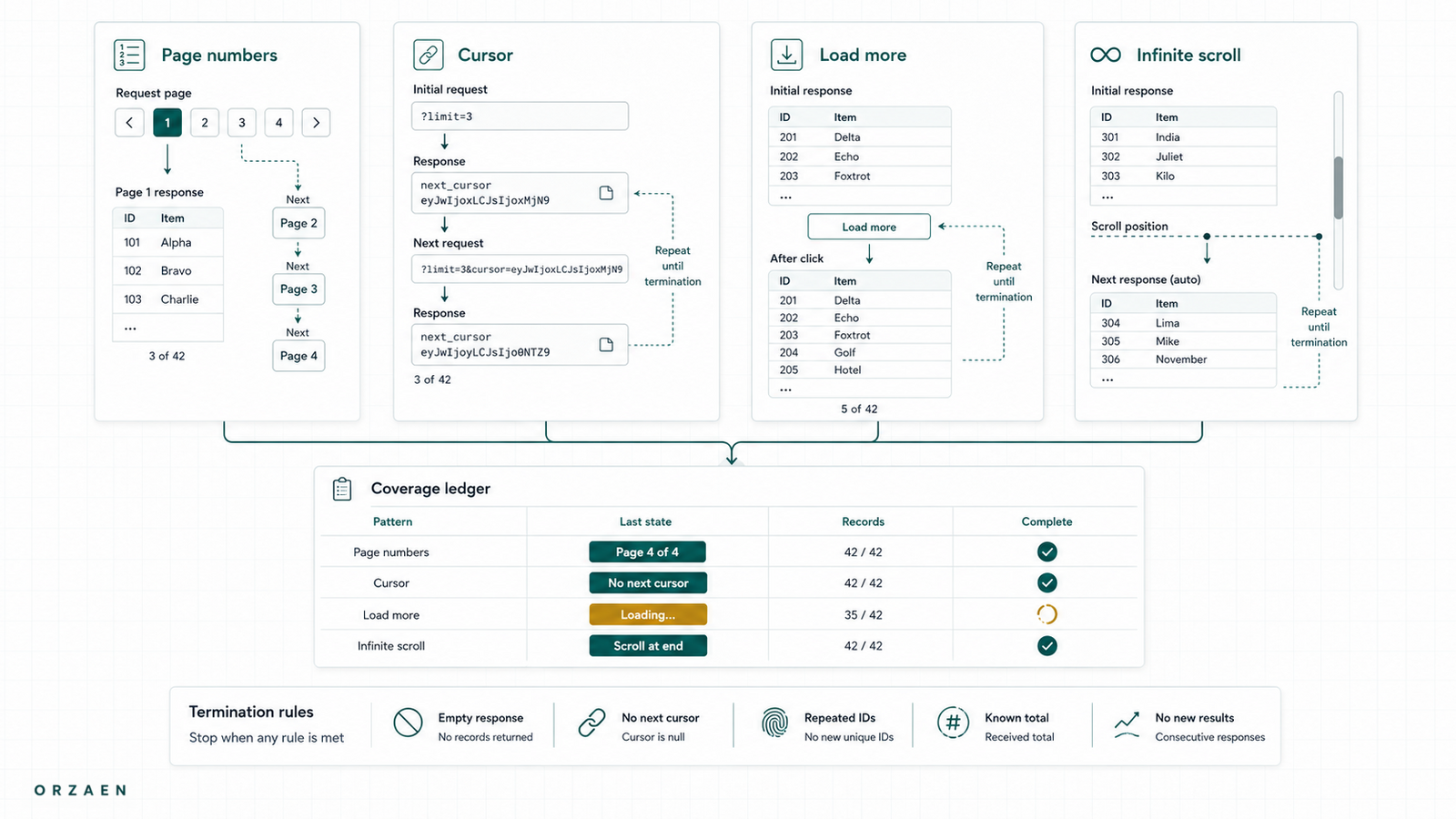
Reliable pagination is not a loop that increments a page number until something fails. A production scraper must identify the source's pagination model, store the next unit of work durably, define an explicit termination rule, deduplicate records and requests, and reconcile the collected set against totals, identifiers, segments, or other coverage evidence.
The visible “Next” button is only one pagination surface. The real state may be a URL, an offset, an opaque cursor, a POST body, a scroll-triggered request, or a capped search window.
The main pagination patterns
| Pattern | Typical state | Reliable stop signal | Common failure |
|---|---|---|---|
| Page number | page=2 or /page/2/ | No next link, known last page, or verified empty page | Repeating the last page forever |
| Offset and limit | offset=100&limit=50 | Offset reaches total or response returns fewer records | Items move between requests and create gaps |
| Cursor | after=opaque_token | hasNextPage=false or no next cursor | Reusing or losing the cursor |
| Load more | Button triggers a request | Button disabled and no next response | Clicking before the prior batch completes |
| Infinite scroll | Scroll triggers XHR/fetch | No new unique records plus source end signal | Stopping during a slow load |
| Segmented search | Query by category, area, date, or alphabet | Every planned segment completed | Overlap and hidden result caps |
| Sitemap or link discovery | URLs listed or linked across files | All indexes and URLs processed | Treating the sitemap as a complete record list |
One source may use several patterns. A listing may use page numbers while the detail page requests more fields from an API. A geographic search may cap each query and require segmentation before pagination even begins.
Start with a coverage model
Before writing the loop, define what complete means.
Useful evidence includes:
- A published result count
- A last-page number
- A GraphQL
pageInfoobject - A unique next cursor
- A finite list of categories, locations, or dates
- A sitemap index and child sitemap counts
- A known set of record identifiers
- A prior snapshot used only as a comparison baseline
No single signal is perfect. Published totals may be rounded, sitemaps may omit filtered records, and result counts can change during a long crawl. Record the evidence and its limitations instead of asserting completeness from a non-empty export.
The scraped-data validation guide explains how to turn these signals into a delivery scorecard.
Page-number pagination
Page-number pagination is easy only when the page number changes the response.
Check:
- Does the URL or request body contain the page state?
- Does the canonical URL change?
- Does the first record identifier change?
- Does the page repeat when the requested number is too high?
- Is there a last-page or total-count signal?
A safe collector should store a fingerprint of each page's record identifiers. If page 37 and page 38 return the same identifiers, stop and classify the repetition. Do not continue until an arbitrary maximum.
Offset-and-limit pagination
Offsets work well for relatively stable result sets. They can miss or repeat records when items are inserted, removed, or re-ranked during the crawl.
Reduce the risk by:
- Applying a stable sort when the source supports it
- Including a unique tie-breaker in database or API queries
- Keeping request and record identifiers
- Recording the collection window
- Using smaller, deterministic segments for high-change datasets
- Reconciling duplicates and gaps after collection
An offset is a position, not an identity. If the dataset changes between page requests, “offset 100” may no longer refer to the same boundary.
Cursor pagination
A cursor is usually an opaque continuation token. Do not decode it, increment it, or assume it is reusable outside the query state that created it.
Persist:
- Cursor received
- Cursor used for the next request
- Query and filter identity
- Response record count
- First and last record identifiers
hasNextPageor equivalent end signal- Response hash or storage reference
For GraphQL, also inspect the errors array. A response can include partial data and still require retry or exception handling.
Infinite scroll and load-more pages
Infinite scroll is an interface behavior, not necessarily the underlying pagination model. The browser may send page, offset, cursor, or search requests after the user scrolls.
Use this sequence:
- Record the initial document and network activity.
- Trigger one controlled scroll or button click.
- Identify the new request and its pagination state.
- Check whether that request can be reproduced appropriately outside the browser.
- If the browser remains necessary, wait for a specific response or record-count change.
- Deduplicate by record identity after every batch.
- Stop only when the source end signal is present and no request is still in flight.
Avoid fixed rules such as “scroll ten times.” Different searches can have different depths, latency, and result caps.
Our guide to scraping JavaScript websites without a browser for every request shows how to separate the interface from the underlying responses.
Search caps require segmentation
Some sources expose only the first set of results for one broad query. Fetching every visible page then gives complete pagination of an incomplete query.
Typical segmentation dimensions include:
- Geography
- Category or specialty
- Date range
- Price band
- Alphabetical prefix
- Product type
- Status
The segment plan must be finite and stored before or during discovery. Every generated segment should have a stable key, status, count, and reason when excluded.
In Orzaen's published VRBO USA property extraction result, geographic traversal and a URL queue were used to work through a large property-search space. The transferable lesson is not that one geography rule fits every platform. It is that coverage caps must be addressed in the discovery design before detail extraction begins.
Separate discovery pagination from detail extraction
Listing pagination discovers record identifiers or detail URLs. Detail extraction collects the final fields. Store those as separate task types.
segment task
  → listing page or cursor task
      → discovered record identity
          → detail extraction task
              → parsed source observation
This separation supports:
- Re-running failed details without repeating discovery
- Measuring discovered versus extracted records
- Updating parsers from stored raw responses
- Identifying which segment produced a record
- Resuming a large crawl safely
For durable task state, see How to Resume a Large Web Crawl Without Duplicating Work.
Define termination rules before the run
Use source-specific stop conditions.
| Pagination model | Primary stop condition | Safety check |
|---|---|---|
| Page number | No next page or reached verified last page | Current page fingerprint differs from prior page |
| Offset | Offset plus returned count reaches total | Stable sort and unique record check |
| Cursor | hasNextPage=false or no cursor | Cursor has not already been processed |
| Load more | Source reports no more results | No pending request and no new unique records |
| Infinite scroll | End marker or exhausted underlying pagination | Bounded idle check plus unique-count stability |
| Segment plan | Every planned segment is terminal | Overlap and cap reconciliation completed |
An empty response can be a stop signal, an expired session, a rate limit, or a parser problem. Classify it before marking the pagination chain complete.
Prevent duplicate work
Deduplicate at two levels.
Request identity
Create a stable key from the source, normalized pagination state, filters, and segment. The same task should not be queued repeatedly because several pages link to it.
Record identity
Prefer a stable source identifier. If none exists, define a composite key based on fields that represent the source record, such as profile URL plus location or product ID plus seller.
Request deduplication controls workload. Record deduplication controls output. They are not interchangeable.
Reconcile after pagination
At the end of a run, report:
- Planned segments
- Completed, failed, excluded, and capped segments
- Pagination tasks discovered and completed
- Unique record identifiers discovered
- Detail records attempted and parsed
- Duplicates by type
- Empty or partial responses
- Totals or source counts observed
- Differences from the previous snapshot
This is stronger than reporting “all pages scraped,” because it exposes the denominator and remaining exceptions.
Common pagination mistakes
Incrementing until an error
Some sources repeat the last valid page or redirect high page numbers. Use source signals and page fingerprints.
Stopping when no new DOM nodes appear immediately
A network response may still be in flight. Wait for the specific response or source state, not a short arbitrary delay.
Ignoring filter state
A cursor or page number usually belongs to one query. Reusing it with different filters can skip or repeat records.
Deduplicating without investigating overlap
Duplicates can be expected across geographic or category segments, but a sudden overlap increase can also reveal a segmentation error.
Trusting one displayed total
Totals can be approximate or change during collection. Preserve them as evidence and reconcile against multiple signals.
Frequently asked questions
How do I scrape all pages when there is no Next button?
Inspect the network activity and page state. The website may use an offset, cursor, load-more request, sitemap, or segmented search. Identify the continuation state and an end signal before automating it.
How do I know when infinite scroll has finished?
Use the application's own end state where possible: no next cursor, a disabled load control, an end marker, or an exhausted API response. Confirm no request remains in flight and no new unique record has appeared. A fixed number of scrolls is not proof.
Are cursor-based APIs safer than page numbers?
Cursors often behave better when records change during traversal, but they still need durable state, error handling, and query identity. A lost cursor can make resumption difficult if earlier responses were not stored.
What if each search returns only a limited number of results?
Partition the search space into approved, finite segments such as geography, category, or date. Measure overlap and confirm that every segment completed. Do not confuse fully paginating one capped query with complete source coverage.
Should pagination and detail scraping run in the same loop?
Not for a large or recurring crawl. Separate discovery tasks from detail tasks so failures, retries, checkpoints, and coverage can be measured independently.
Next step
Use the scalable web-scraping pipeline as the system overview, then apply crawl monitoring to track pagination progress and missing segments during each run. For a source with complex result caps or recurring collection, review Orzaen's Web Scraping & Data Extraction service.