
Short answer
A JavaScript-rendered website does not automatically require a browser for every page. First use browser developer tools or Playwright to identify where the required records come from. If the page loads repeatable JSON, GraphQL, embedded state, or server HTML, a production pipeline can often use the browser only for discovery or session creation and collect the remaining records with direct HTTP requests.
The browser should perform the work that genuinely requires browser state. It should not become the default transport merely because JavaScript exists on the page.
Why browser-only scraping becomes expensive
A browser downloads, parses, executes, lays out, and renders far more than the dataset usually needs. It may load images, fonts, analytics, videos, advertisements, and interface code before the required records become visible.
That extra work affects:
- Memory and CPU use per worker
- The number of pages that can run concurrently
- Navigation and waiting time
- Failure recovery after a browser crash
- Session and process management
- Infrastructure cost per successful record
Browser automation is still necessary for some sources. The goal is not to eliminate it. The goal is to confine it to authentication, consent, navigation, interaction, token creation, or other state that cannot be reproduced safely with a lighter request.
For the broader execution comparison, read Requests vs Playwright vs Selenium.
Where JavaScript-loaded data actually comes from
A rendered page can combine several data surfaces.
| Data surface | How it appears | Typical collection method | Main risk |
|---|---|---|---|
| Server-rendered HTML | Present in the initial document response | HTTP client plus HTML parser | Detail fields may load later |
| Embedded JSON | Stored in a script element or page state | HTTP client plus JSON extraction | State format may change between releases |
| XHR or fetch response | Requested after page load or interaction | Repeat the approved network request | Tokens, cookies, or headers may be required |
| GraphQL response | Returned from a GraphQL endpoint | Reproduce the query and variables | Pagination and partial errors need explicit handling |
| Rendered DOM only | Created after scripts run | Browser automation | Highest execution cost |
| User-controlled state | Available only after login, consent, or interaction | Browser session, sometimes followed by HTTP | Authorization and session expiry must be handled |
The correct question is therefore not, “Is this website built with JavaScript?” It is, “Which response contains the exact record we need?”
Our deeper guide to API vs HTML vs Browser Automation explains how to make that source decision.
Inspect the source before choosing the crawler
1. Define the record first
Write the required fields and the expected unit of one record. For a product dataset, that might be one product-location combination rather than one page. For a directory, it may be one profile or one profile-location relationship.
Without a field list, it is easy to choose a convenient response that does not actually provide complete coverage.
2. Compare the initial HTML with the rendered page
Open the document response and search for several visible values. If the product name, identifier, price, or profile fields already exist in the HTML or structured state, browser rendering may not be needed for those fields.
Do not test only the first page. Compare listing pages, detail pages, filtered states, and later pagination.
3. Record network activity
Use the browser Network panel while loading the page and performing the interaction that reveals more records. Filter for fetch, XHR, and GraphQL activity, then inspect:
- Request URL and method
- Query parameters or request body
- Cookies and authorization headers
- Pagination values
- Response structure
- Total-count or next-page signals
- Error objects inside successful HTTP responses
Chrome DevTools can preserve the network log across navigation and export a HAR file for review. Playwright can also observe requests and responses programmatically.
4. Reproduce one request outside the browser
Test the same request with an HTTP client using only the state that is genuinely required. If it succeeds, test several pages and a fresh session. A request that works once with copied headers is not yet a maintainable extraction method.
5. Compare field and coverage parity
The direct response must be checked against the browser-visible records. Confirm that it provides:
- The same identifiers
- The same filter state
- The same number of result pages or cursor chain
- The required detail fields
- A reliable termination condition
Faster extraction is not useful if it quietly omits a result type or geographic segment.
A practical hybrid architecture
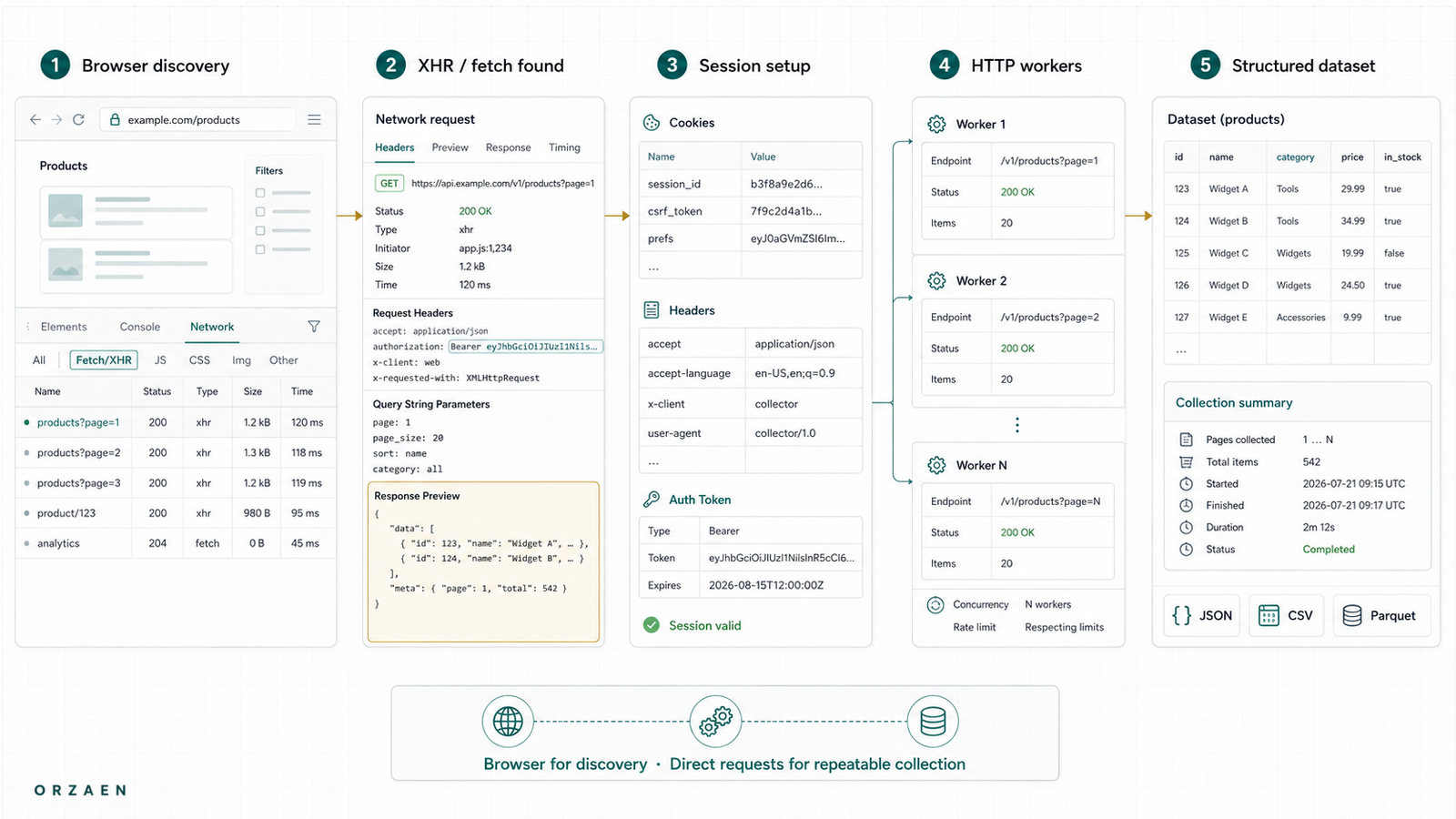
The most useful pattern is often browser discovery followed by HTTP extraction.
Browser discovery or session setup
        ↓
Capture approved cookies, tokens, request shape, and pagination
        ↓
Direct HTTP workers collect repeatable HTML or JSON responses
        ↓
Raw responses are stored with source URL and collection time
        ↓
Parsers normalize records and run coverage checks
        ↓
Browser is reopened only when state expires or an interaction is required
This architecture separates three concerns:
- State acquisition: creating the browser state required by the source.
- Data acquisition: collecting the repeatable responses that contain records.
- Parsing and validation: converting responses into an agreed schema and proving coverage.
That separation makes failures easier to diagnose. A session failure does not look like a parser failure, and an empty API response is not silently accepted as a successful page.
What the browser should still do
Use a browser when the source genuinely requires:
- JavaScript execution to create a token or session
- A click, search, scroll, or consent interaction before data is requested
- Browser-managed authentication that the project is permitted to use
- Client-side decryption or transformation
- A page state that cannot be represented as a stable request
- Validation that the direct response matches what a user sees
Even then, it may not need to load every asset. Playwright supports request routing, including aborting resource types that do not contribute to the required page state. This should be tested carefully because blocking a script or stylesheet can change application behavior.
What the HTTP workers should do
Direct request workers are well suited to repeatable document, JSON, or GraphQL collection. They should:
- Reuse a controlled session where appropriate
- Apply per-source concurrency and pacing
- Preserve the request identity and pagination state
- Respect
Retry-Afterand source-specific limits - Store raw responses before transformation when permitted
- Classify empty, blocked, expired, and malformed responses separately
- Retry only failures that are safe and temporary
The 403, 429, and temporary-failure guide explains why one retry rule should not be applied to every response.
Sessions, cookies, and tokens need explicit ownership
A copied cookie is not an architecture. Document:
- Which step creates the session
- Which values expire and how expiry is recognized
- Whether state may be shared across concurrent workers
- Which request or domain the token belongs to
- What happens when refresh fails
- Whether the source permits the intended automated use
Some state must remain sticky to one IP or browser context. Other tokens can be used by a limited HTTP worker pool. Treating all cookies as globally reusable can cause inconsistent results or repeated authentication failures.
GraphQL requires more than finding the endpoint
A GraphQL request normally includes an operation, variables, and a response that can contain both data and errors. A response with HTTP 200 may still be incomplete.
Validate:
- The operation and variables for each result state
- Cursor or offset behavior
- Whether fields change by product or profile type
- Both top-level and nested errors
- Null rates by field
- The relationship between discovered identifiers and returned records
In Orzaen's published Kramp crawler and GraphQL result, URL discovery and GraphQL extraction were separate stages. That is the important engineering lesson: discovery coverage and record extraction require different state and different validation.
What a real hybrid result looks like
Orzaen's published YouTube hybrid proxy-rotation engine used browser automation for discovery and direct HTTP requests for extraction. The public case study reports approximately fivefold faster processing after this separation.
That number belongs to that specific result, not every JavaScript website. The reusable pattern is narrower:
- Discover or refresh the required state in a browser.
- Move repeatable response collection to controlled HTTP workers.
- Measure completeness and failure classes before comparing speed.
Common mistakes
Replaying a copied request forever
Copied tokens, signatures, or cookies may expire or be tied to a session. Build explicit refresh and failure detection instead of treating a one-time capture as permanent.
Assuming every JSON endpoint is an official public API
A page request can be technically visible without being offered for unrestricted third-party use. Review source terms, access controls, intended use, and available first-party options.
Optimizing speed before coverage
Test all result types, filters, pagination paths, and detail fields before replacing the browser path.
Treating HTTP 200 as success
The response can contain an empty state, login page, challenge, partial GraphQL error, or changed schema. Validate the content, not only the status.
Running browser and HTTP extraction as one inseparable script
Separate session creation, request collection, parsing, and persistence. A component can then be retried or replaced without restarting the entire crawl.
Frequently asked questions
Can Requests scrape a JavaScript website?
Requests does not execute JavaScript. It can still collect a JavaScript website's initial HTML, embedded JSON, or repeatable network responses when those responses are accessible and appropriate for the project. Use a browser to discover the data surface or create required state when necessary.
Is a hidden JSON endpoint always better than browser automation?
No. It may omit fields, use short-lived state, enforce different limits, or not be appropriate for third-party use. Compare coverage, stability, access requirements, and maintenance cost before choosing it.
Can Playwright capture XHR and GraphQL responses?
Yes. Playwright exposes browser network events and routing APIs that can observe requests and responses. The captured request still needs to be tested for session requirements, pagination, errors, and repeatability.
Should images and fonts always be blocked?
No. Blocking unnecessary assets can reduce browser work, but some applications behave differently when expected resources or scripts do not load. Measure the effect on the required page state and records.
How do I know when the hybrid approach is worthwhile?
It is most useful when a browser is required to discover or establish state, but many subsequent records come from repeatable HTML or structured responses. Compare complete-record throughput, failure rate, and infrastructure use—not navigation speed alone.
Next step
Start with the full scalable web-scraping pipeline, then use the pagination patterns guide to prove the direct response covers every result page. If you need a production collection system assessed or built, review Orzaen's Web Scraping & Data Extraction service.
Sources
- Chrome DevTools Network panel (opens in a new tab)
- Playwright network documentation (opens in a new tab)
- Playwright APIRequestContext (opens in a new tab)
- Requests advanced usage (opens in a new tab)
- GraphQL response specification (opens in a new tab)
- RFC 9309: Robots Exclusion Protocol (opens in a new tab)