
Short answer
Use Requests when the required data is available through ordinary HTTP responses and browser rendering is unnecessary. Use Playwright or Selenium when collection genuinely requires a browser: JavaScript execution, interaction, login state, frames, or browser-managed behavior. For large projects, the best design is often hybrid—use a browser for discovery or session setup, then use direct HTTP requests for repeatable structured extraction when the source and approved access allow it.
The decision should be based on where the data comes from and what state is required, not on which library appears in the most tutorials.
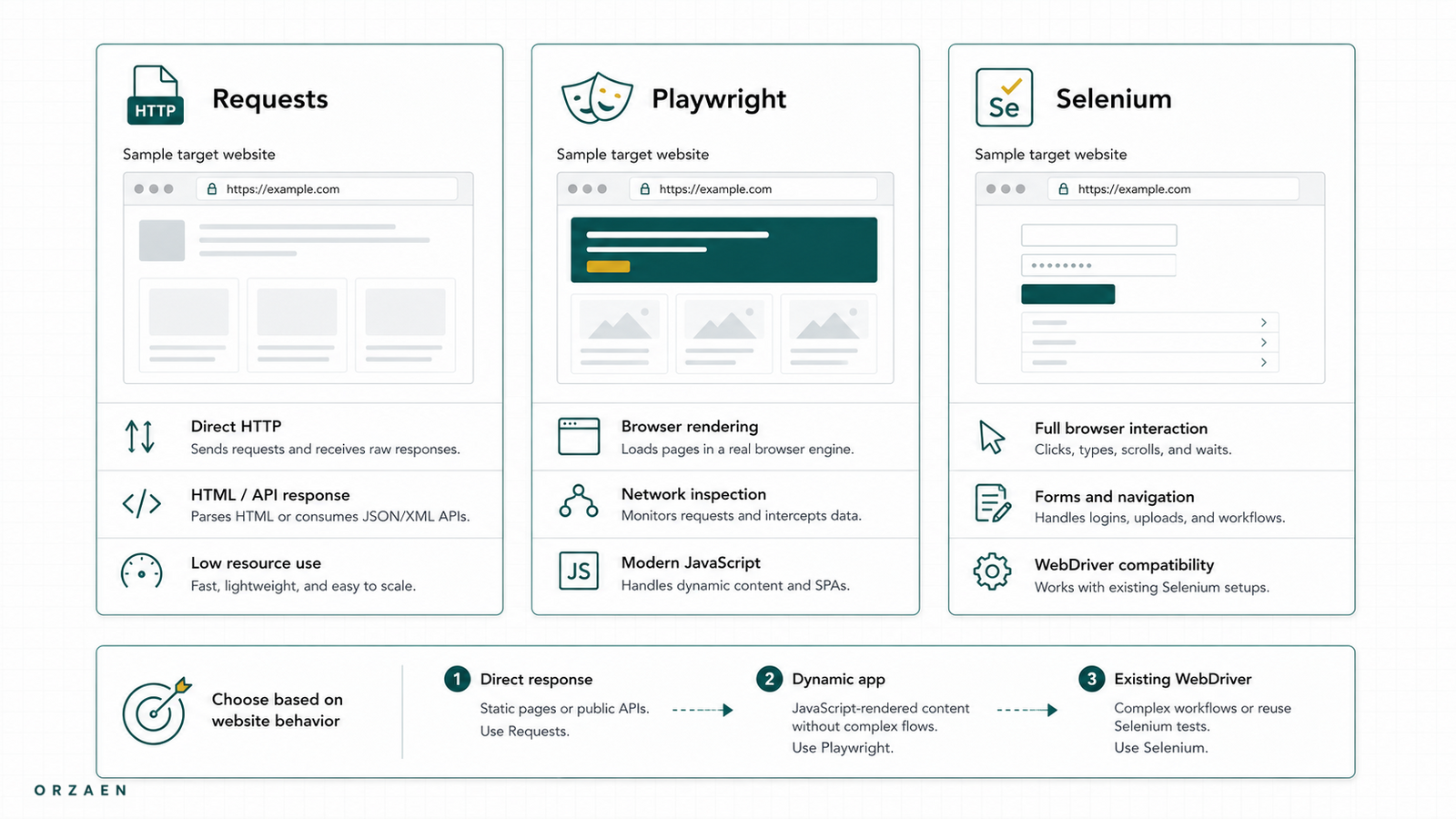
Requests, Playwright, and Selenium compared
| Question | Requests | Playwright | Selenium |
|---|---|---|---|
| Runs a real browser | No | Yes | Yes |
| Executes page JavaScript | No | Yes | Yes |
| Handles clicks, forms, frames, and browser storage | Only by reproducing HTTP behavior | Yes | Yes |
| Observes page network traffic | Through the HTTP calls you make | Built-in page request and response events | Possible through browser tooling and integrations, but less central to its standard API |
| Typical resource cost per worker | Lowest | Higher | Higher |
| Best fit | HTML, JSON, APIs, downloads, high-volume repeated requests | Modern browser workflows, network inspection, multi-browser automation | Browser workflows, broad ecosystem, existing Selenium systems |
| Main risk | Missing browser-generated state or content | Paying browser cost where HTTP would work | Paying browser cost and maintaining waits/drivers where HTTP would work |
Requests is not a lightweight browser. Playwright and Selenium are not merely slower HTTP clients. They operate at different layers.
What Requests actually does
The Python Requests library sends HTTP requests and returns the server's response. It supports sessions, cookies, authentication, headers, streaming, proxies, and connection pooling. A `Session` (opens in a new tab) can persist cookies and reuse connections across requests.
Requests is a strong choice when:
- The required fields are in server-rendered HTML.
- A public page retrieves a stable JSON or GraphQL response that can be used appropriately.
- The source provides an approved API, download, or feed.
- The crawl needs high throughput without JavaScript execution.
- The workflow is easier to reproduce as explicit HTTP requests.
Requests alone will not execute JavaScript embedded in a document. If a price, table, or result list appears only after page scripts run, response.text may contain an empty container or application shell instead of the visible records.
That does not automatically mean "use Selenium." First inspect the document and network activity. The page may be retrieving the data through a separate structured response.
What Playwright adds
Playwright automates Chromium, Firefox, and WebKit browsers. It provides browser contexts for isolated sessions, automatically waits for actionability conditions around many interactions, and exposes page network events and routing. Its network documentation (opens in a new tab) covers monitoring and handling HTTP traffic made by a page.
Playwright is a strong choice when:
- Page JavaScript creates the required state.
- The workflow needs clicks, search input, scrolling, or multi-step navigation.
- The data appears after a genuine browser interaction.
- The source uses frames or browser storage.
- Network observation is part of source discovery.
- Several isolated browser sessions must run in one browser process.
Playwright's locator model is designed around finding elements and includes auto-waiting and retryability. Even so, a scraping workflow still needs source-specific readiness conditions. Waiting for a button to be visible is not proof that the final dataset has loaded.
What Selenium adds
Selenium WebDriver drives browsers natively, locally or remotely, using the browser-automation standard. The official WebDriver documentation (opens in a new tab) covers navigation, elements, interactions, cookies, waits, frames, and windows.
Selenium remains a valid choice when:
- The team already operates reliable Selenium systems.
- Existing code, infrastructure, or browser integrations depend on it.
- A required browser or grid setup fits Selenium's ecosystem.
- The workflow is interactive and the team is comfortable maintaining explicit waits and driver behavior.
The problem is not Selenium itself. The problem is choosing a full browser when the target is a stable HTML or JSON response.
The first question: is the data in the HTTP response?
Check three places before selecting a browser:
- The original document response.
- Embedded structured data or application state in the document.
- XHR,
fetch, GraphQL, or file responses requested by the page.
Use the browser's Network panel to reload the page, filter request types, and inspect response bodies. The Chrome DevTools documentation (opens in a new tab) explains how to record and inspect page network activity.
If the record is available as a stable structured response, direct HTTP extraction may reduce runtime, memory, and waiting complexity. If the request depends on short-lived browser state, signed values, or interactive context, a browser may remain part of the production system.
The deeper source-selection process is covered in API vs HTML vs Browser Automation.
The second question: what state must be preserved?
Some sources require no state. Others require cookies, login sessions, location selection, consent, search parameters, or navigation history.
| Required state | Likely starting point |
|---|---|
| No state; public HTML | Requests |
| Cookies established by a simple HTTP flow | Requests Session |
| Authenticated workflow with browser interaction | Playwright or Selenium, subject to approved access |
| Search results after an interactive form | Browser for discovery; inspect whether results come from reusable HTTP calls |
| Infinite scrolling with structured page requests | Browser for discovery; HTTP or browser for extraction depending on request requirements |
| File download behind a public link | Direct HTTP download when possible |
Do not copy a browser cookie into an HTTP client and assume it will remain valid indefinitely. Sessions expire, source behavior changes, and the production system needs an explicit refresh and failure policy.
The third question: how much browser work can the budget support?
At small volume, the difference may not matter. At hundreds of thousands of items, it affects:
- Memory per worker
- CPU usage
- Startup time
- Concurrent sessions per machine
- Page resource bandwidth
- Waiting and timeout behavior
- Failure recovery
- Infrastructure cost
A browser may request images, fonts, scripts, analytics, and other assets that the extraction does not need. Selective resource handling can help, but it adds logic that should be tested carefully because blocking the wrong asset may change page behavior.
Direct HTTP extraction can usually run more concurrent work per machine. That advantage disappears if the team spends weeks reverse-engineering unstable requests that a browser could handle reliably. Production cost includes engineering and maintenance, not only servers.
Waiting is a data-quality decision
A frequent browser mistake is a fixed delay:
time.sleep(5)Five seconds can be unnecessarily slow on one run and still too short on another. Prefer a condition tied to the actual workflow:
- A specific response completed.
- A result count appeared.
- A loading indicator disappeared.
- A stable row or card exists.
- Pagination state changed.
- The expected structured payload was captured.
Selenium documents implicit and explicit waits (opens in a new tab) and warns against mixing them because that can create unpredictable wait times. Playwright actions include auto-waiting, but extraction still needs a condition that represents data readiness rather than mere element actionability.
Why hybrid extraction often wins
A hybrid system assigns each tool the narrowest job it performs well.
browser
  -> establish approved state
  -> perform interactive discovery
  -> observe relevant request

HTTP client
  -> retrieve repeatable HTML or structured responses
  -> run at source-aware concurrency
  -> persist response and status
In Orzaen's YouTube hybrid extraction result, Selenium handled discovery while HTTP requests handled the extraction stage. The published case study reports that this change improved speed by about five times compared with the earlier approach.
That result does not mean every YouTube or browser workflow can use the same design. It demonstrates the broader principle: isolate the expensive interactive step from the repeatable extraction step.
For the full discovery-to-HTTP pattern, including cookies, tokens, GraphQL errors, and coverage parity, read How to Scrape JavaScript Websites Without Using a Browser for Every Request.
When Requests is the wrong choice
Requests is likely wrong as the only tool when:
- The required content exists only after JavaScript execution and no suitable structured response is available.
- The workflow depends on browser events or storage that cannot be reproduced reliably.
- The page requires interaction to produce the approved record set.
- The team cannot define or maintain the HTTP state without fragile reverse engineering.
A 200 response does not prove success. Validate content type, response signature, expected fields, and page state.
When browser automation is the wrong choice
Playwright or Selenium is likely excessive when:
- The same fields are already in static HTML.
- A documented API or download supplies the required data.
- A simple JSON response contains the complete record.
- The crawl is large and the browser contributes no necessary state.
- Fixed sleeps dominate the workflow.
Browser automation can still be useful during research even when it is absent from the final extractor.
Playwright or Selenium: how should you choose?
If a browser is required, compare the team's real constraints.
Choose Playwright when its browser contexts, network controls, locator model, and multi-browser tooling simplify the specific workflow. Choose Selenium when existing expertise, code, infrastructure, or browser-grid requirements make it the more maintainable option.
Run a small source-specific benchmark. Measure:
- Median and high-percentile item time
- Memory per concurrent session
- Failure rate by stage
- Timeouts and retry behavior
- Session renewal
- Ease of diagnosing missing records
- Packaging and deployment effort
Do not choose from a feature table alone.
Where Scrapy fits
Scrapy is not a fourth rendering engine in this comparison. It is a framework for crawling websites and extracting structured data, and it can also work with APIs. It provides scheduling, duplicate filtering, pipelines, throttling, statistics, and persistence. A project can use Scrapy with ordinary HTTP requests and introduce a browser handler only for selected URLs.
For a complete system design, read How to Build a Scalable Web Scraping Pipeline.
A practical decision sequence
- Define the required fields and expected coverage.
- Review approved access, terms, robots directives, and rate expectations.
- Inspect the original document and network activity.
- Identify the simplest reliable data surface.
- Determine what session or browser state is necessary.
- Prototype the narrowest method.
- Benchmark throughput, failure recovery, and data completeness.
- Add browser automation only where it creates necessary state or reliability.
- Validate output against the expected input or crawl frontier.
If the source uses pages, offsets, cursors, load-more controls, or infinite scroll, apply the separate web-scraping pagination patterns before calling the method complete.
Frequently asked questions
Is Playwright faster than Selenium for scraping?
It depends on the workflow, browser, waits, resource loading, concurrency, and implementation. Benchmark the actual source. The larger architectural difference is usually browser automation versus direct HTTP extraction, not Playwright versus Selenium in isolation.
Can Requests scrape JavaScript websites?
Requests does not execute JavaScript. It can still collect data used by a JavaScript website if that data is available through an appropriate HTML, JSON, GraphQL, file, or API response that the client can access legitimately.
Is Selenium outdated for web scraping?
No. Selenium WebDriver remains actively documented and widely used. It may be the right tool for a browser workflow, especially in an established Selenium environment. It should not be used automatically when a simpler response contains the data.
Should every production scraper use a hybrid approach?
No. Static pages and straightforward APIs may need only HTTP. A genuinely interactive source may remain browser-based. Hybrid architecture is useful when a small browser step can unlock a much larger repeatable HTTP stage.
Which tool handles infinite scroll best?
Playwright and Selenium can perform scrolling and observe loaded elements. Before implementing repeated scrolling, inspect whether the page uses a cursor-based JSON request. The better extraction surface depends on the request's stability, fields, state, and approved use.
Next step
Orzaen's web scraping and data extraction service starts with source and field review before implementation. Continue with the JavaScript hybrid-extraction guide when a browser is needed for only part of the workflow. See the YouTube hybrid extraction result for a browser-plus-HTTP example and the Kramp GraphQL extraction result for large-scale structured-response collection.
Sources
- Requests documentation (opens in a new tab)
- Requests Session objects (opens in a new tab)
- Playwright documentation (opens in a new tab)
- Playwright locators and auto-waiting (opens in a new tab)
- Playwright network documentation (opens in a new tab)
- Selenium WebDriver documentation (opens in a new tab)
- Selenium waits (opens in a new tab)
- Scrapy overview (opens in a new tab)
- Chrome DevTools Network panel (opens in a new tab)