
Short answer
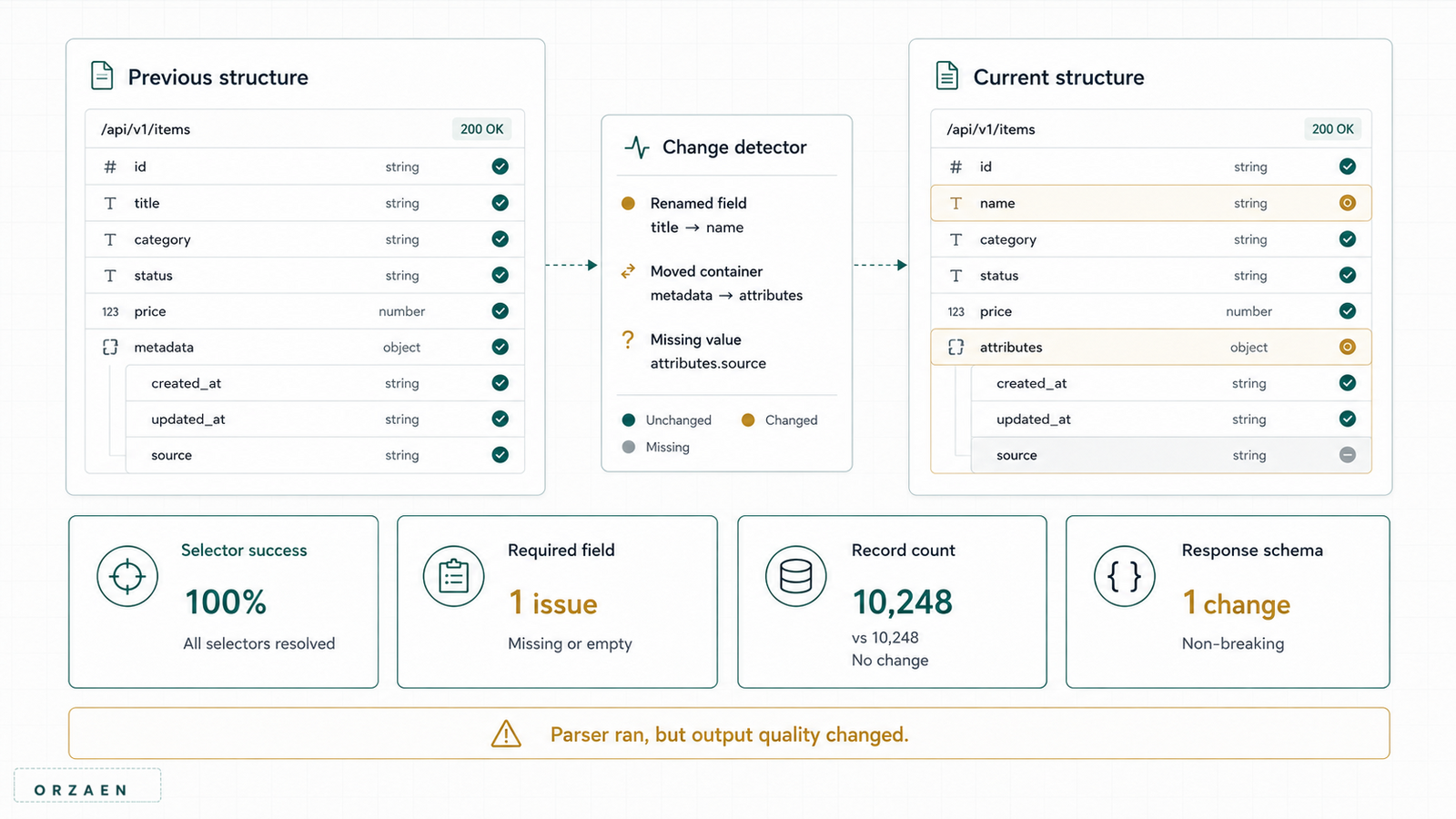
Detect scraper-breaking website changes by monitoring both responses and extracted data. Track response status, content type, size, template signatures, required-field coverage, records per page, duplicate rates, and expected partitions. Run representative sentinel pages before or during each production cycle, version parsers, preserve raw fixtures, and alert on sustained deviations from each source's baseline. A successful request or completed process is not proof that the data is still correct.
The most dangerous scraper failure is not a visible crash. It is a clean run that quietly returns empty, shifted, duplicated, or incomplete fields.
This article focuses on source drift after deployment. The scalable web scraping pipeline guide explains the full architecture that produces the crawl state, raw observations, and validation metrics used here.
What can change?
| Change layer | Example | Likely symptom |
|---|---|---|
| Access and response | Login introduced, redirect, 403, 429, or error template | Status or response-signature change |
| Navigation | Category path, sitemap, or pagination changes | Discovery count drops |
| Markup | Class, label, table, or page template changes | Field coverage falls or wrong text is parsed |
| Structured response | JSON path, GraphQL operation, nesting, or data type changes | Parser errors or null fields |
| Browser workflow | Button, frame, timing, consent, or interaction changes | Step timeout or wrong page state |
| Business semantics | Field label stays but meaning changes | Plausible yet incorrect values |
| Source inventory | Entity added, moved, merged, or removed | Snapshot differences |
Different changes need different signals. A selector test will not detect an entire category disappearing from discovery.
The monitoring layers
Use five layers together.
- Transport: request status, latency, redirects, content type, and retries.
- Response: template, size, structured paths, and recognizable page state.
- Parsing: required fields, extraction exceptions, and parser version.
- Dataset: counts, field coverage, distributions, duplicates, and partitions.
- Business freshness: added, changed, missing, and unchanged entities across snapshots.
Infrastructure monitoring belongs underneath these layers, but healthy CPU and memory cannot prove healthy data.
1. Establish a baseline for every source
A baseline describes normal behavior, not a universal target.
Record:
- Typical response statuses
- Accepted content types
- Response-size range
- Redirect behavior
- Listing pages or partitions
- Approximate entity-count range
- Required-field coverage
- Optional-field coverage
- Records per listing page
- Duplicate-key rate
- Typical run duration and latency
- Last verified parser version
Use a time window or known-good runs, not one page collected once. Sources can vary by weekday, inventory, geography, or content type.
Thresholds should express both absolute and relative change. A drop from 20 records to zero is critical even though the absolute difference is small; a drop from 200,000 to 199,900 may be normal business change.
2. Create representative sentinel pages
A sentinel is a known source page or request selected to expose likely failures early.
For each source family, include examples such as:
- Listing page with pagination
- Detail page with every common field
- Detail page with intentionally missing optional fields
- Multi-location or multi-variant record
- Later pagination page
- Geographic or category edge case
- Authenticated or interactive workflow, when approved
Before a large crawl, run sentinels and check:
- Expected response state
- Required fields
- Stable identifiers
- Record count range
- Pagination signal
- Structured-response paths
Sentinels reduce the chance of discovering a broken parser after millions of requests. They do not replace full-run coverage monitoring because a source can change only one template or partition.
3. Detect response changes before parsing
Status and redirect checks
Record the final URL, redirect chain, status, and headers. A source can start redirecting detail pages to a login, consent, regional, or generic error page while still returning 200 at the end.
Content-type checks
An expected JSON response may become HTML. A file download may become a small error document. Reject or quarantine unexpected types before the parser treats them as data.
Size and shape checks
Track response-size distributions per endpoint or page type. A sharp collapse can indicate an empty shell or error template. Size is an alert signal, not proof; legitimate records vary.
For JSON or GraphQL, monitor required paths and value types. For HTML, monitor stable structural features such as page title pattern, canonical URL, entity identifier, primary heading, or known container.
Template signatures
Create a normalized signature from stable structural features rather than hashing the entire response.
An exact HTML hash changes because of timestamps, recommendations, ads, or session values. A structural signature might include:
- Ordered heading levels
- Stable element roles or labels
- Presence of required JSON keys
- Selected tag paths
- Known page-state markers
Use the signature to route an unfamiliar template to review; do not automatically declare every difference a break.
4. Monitor extracted-field coverage
Field coverage is one of the strongest silent-failure signals.
For each source and parser version, calculate:
coverage(field) = non-null valid values / valid source recordsTrack required and optional fields separately. Alert on:
- A required field falling below its hard threshold
- An optional field moving far outside its baseline
- Several related fields dropping together
- One worker batch producing a different pattern
- Coverage changing immediately after a parser deployment
Examples:
product_namefalls from nearly universal to zero: likely parser or template failure.sale_pricefalls during a promotion change: possibly legitimate; review source behavior.phonefalls only for one provider-directory family: likely a family template change.
Monitor both nulls and invalid values. A selector shift can extract navigation text into a required field, leaving coverage at 100% while correctness collapses.
5. Monitor distributions and invariants
Useful invariants include:
- Price is non-negative and currency is expected for the source.
- Coordinates remain in the expected region.
- Pagination cursors do not repeat indefinitely.
- Entity IDs remain unique within the source snapshot.
- Input enrichment returns one status per input row.
- Delivered rows equal valid plus explicitly accepted exception categories.
- Every discovered partition reaches a terminal status.
Useful distributions include:
- Records by source, geography, category, or status
- String length by field
- Numeric ranges and quantiles
- Categorical value frequencies
- Entities per listing page
- Response and parse time
Compare distributions with prior runs and source expectations. Do not alert on any change; alert on unexplained change that crosses a material threshold.
6. Reconcile the crawl frontier
A monitor should be able to answer:
discovered = validated + invalid + retryable + terminal + excluded + in_progressWhen the run closes, in_progress should be zero and every other bucket should have explicit identities.
Track attempts separately from unique entities. Otherwise a retry surge can make request volume look healthy while unique coverage falls.
Scrapy provides a key/value statistics collection facility (opens in a new tab), and its job persistence can retain scheduled and visited request state for pausing and resuming crawls (opens in a new tab). Custom systems should expose equivalent frontier and item counters.
This reconciliation belongs inside the broader Web Scraping Pipeline Monitoring system, which also tracks worker health, retries, data quality, and delivery. Change detection remains responsible for identifying source drift and the affected parser scope.
7. Preserve fixtures and raw evidence
For each adapter, keep approved representative fixtures or response snapshots where permitted. Tie them to:
- Source ID
- Page or response type
- Collection date
- Parser version
- Expected parsed fields
- Redacted or storage-safe form when necessary
Run fixture tests before deploying a parser change. Then run live sentinels because stored fixtures cannot show current source behavior.
Raw response references also shorten incident diagnosis. When coverage fell at 03:10, the team can inspect what the source actually returned instead of trying to reproduce the same state hours later.
8. Version parsers and schemas
Every observation should identify the parser and schema version that produced it.
Versioning allows the team to:
- Compare old and new parser output on the same fixture
- Limit reprocessing to affected sources
- Identify which records need correction
- Roll back a bad parser release
- Explain why a field changed between snapshots
Do not edit a parser in place and overwrite all current records without retaining the relationship to the prior source observations.
9. Use a change-detection pipeline for recurring data
Website-change detection and business-data change detection are related but different.
After validating the new snapshot, match records using stable source keys and classify:
| State | Meaning |
|---|---|
added | Key appears in the new snapshot only |
changed | Key exists in both; one or more monitored fields changed |
unchanged | Key exists in both; monitored fields match |
missing | Key existed previously but was not observed now |
unresolved | Current collection was insufficient to classify the entity |
Do not immediately convert missing into deleted. The page may have moved, the partition may have failed, or access may have changed. Require source-specific confirmation rules.
Compare normalized fields for business changes, but retain raw values to investigate formatting-only differences.
10. Set actionable alerts
An alert should include:
- Source and adapter family
- Metric and current value
- Baseline or threshold
- First affected run and time
- Example URLs or record keys
- Parser version
- Response status, type, or signature where relevant
- Estimated affected record count
- Link to raw artifacts or logs
- Suggested owner and severity
Alert levels can be:
| Severity | Example |
|---|---|
| Critical | Discovery returns zero; required identifier coverage collapses; access becomes prohibited |
| High | One large partition is missing; response template changes across most pages |
| Medium | Optional field coverage drops materially; duplicate rate rises |
| Low | New categorical value or isolated unknown template appears |
Avoid one notification per failed URL. Aggregate related failures into one incident while retaining the underlying exception list.
11. Respond to a detected change safely
Use this incident sequence:
- Pause or limit the affected source if continuing could create bad data or inappropriate traffic.
- Confirm whether the signal is a real source change, temporary incident, or bad deployment.
- Inspect representative raw responses and current live behavior.
- Determine whether discovery, fetching, parsing, normalization, or validation changed.
- Update the adapter and fixtures.
- Test old fixtures, new fixtures, and live sentinels.
- Reprocess stored responses when possible.
- Recrawl only the affected frontier when necessary and appropriate.
- Reconcile the corrected output.
- Record the incident, impact, and prevention rule.
Do not patch the selector and immediately rerun the entire source without calculating the affected range.
An example monitoring record
{
  "run_id": "source_014_2026-07-22",
  "source_id": "source_014",
  "parser_version": "source_014@7",
  "urls_discovered": 12840,
  "urls_fetched": 12802,
  "records_valid": 12761,
  "records_exception": 41,
  "required_field_coverage": {
    "source_key": 1.0,
    "name": 0.998,
    "category": 0.941
  },
  "response_statuses": {
    "200": 12770,
    "404": 12,
    "429": 20
  }
}
These values are illustrative. Production thresholds should come from the actual source contract and baseline.
What Orzaen's recurring work implies
Orzaen's public results span large crawls, bulk enrichment, property collection, social-platform workflows, and recurring provider directories. The operating lesson across them is that the deliverable is not just a parser.
The Kramp crawl result describes deduplication and URL validation across HTML and GraphQL artifacts. The Instagram bulk enrichment result describes batching, retries, and input-order preservation. The recurring hospital directory result makes freshness and repeatability part of the work.
Those controls should become measurable monitors rather than remain implementation details.
Common monitoring mistakes
Alerting only on crashes
The process may finish while the parser returns blanks. Track field coverage and reconciliation.
Hashing the entire page
Dynamic content creates constant noise. Use stable structural features and dataset signals.
Using one threshold for every source
Normal volume and field coverage differ. Baselines belong to the source and page type.
Ignoring discovery
Perfect detail-page parsing cannot recover entity URLs that were never discovered.
Calling every missing key deleted
Absence in one crawl is not proof of a real-world deletion. Distinguish missing from confirmed_removed.
Monitoring requests instead of unique work
Retries can increase request counts while successful unique entities decline.
Keeping no parser version
Without version lineage, the team cannot identify which records were produced before or after a change.
Frequently asked questions
How often should sentinel pages run?
Run them before each material production cycle and after parser, browser, or source-policy changes. High-frequency or high-impact pipelines may run sentinels continuously or before each partition batch.
Can visual screenshots detect scraper changes?
Screenshots can help diagnose browser workflows and major template changes, but they are difficult to validate at scale. Combine them with response signatures, structured-path checks, field coverage, and crawl reconciliation.
Should a scraper stop when one field is missing?
It depends on the field and source contract. A missing required identifier may justify quarantining the record or pausing the source. A normally optional field should be recorded and monitored without stopping all work.
How do I distinguish a website change from normal data change?
Website changes affect response structure, paths, templates, or field distributions across many records. Business changes affect entity values within a stable structure. Raw observations, parser versions, sentinels, and cross-record patterns help distinguish them.
What should happen to records collected by a broken parser?
Identify the affected source, parser version, run, and field set. Reparse stored raw responses when possible; otherwise recrawl only the affected scope when appropriate. Do not silently merge corrected and uncorrected records.
Next step
For a recurring scraper that needs run summaries, source baselines, exceptions, and refresh logic, review Orzaen's web scraping and data extraction service. Implement the complete pipeline monitoring model and preserve restart state with the crawl-resumption guide. Related proof includes the Kramp crawl result, Instagram bulk enrichment result, and recurring hospital-directory result.
Sources
- Scrapy statistics collection (opens in a new tab)
- Scrapy pausing and resuming crawls (opens in a new tab)
- Scrapy spider contracts (opens in a new tab)
- JSON Schema validation specification (opens in a new tab)
- Playwright network documentation (opens in a new tab)
- Playwright screenshots (opens in a new tab)
- Selenium waits (opens in a new tab)
- RFC 6585: HTTP 429 Too Many Requests (opens in a new tab)